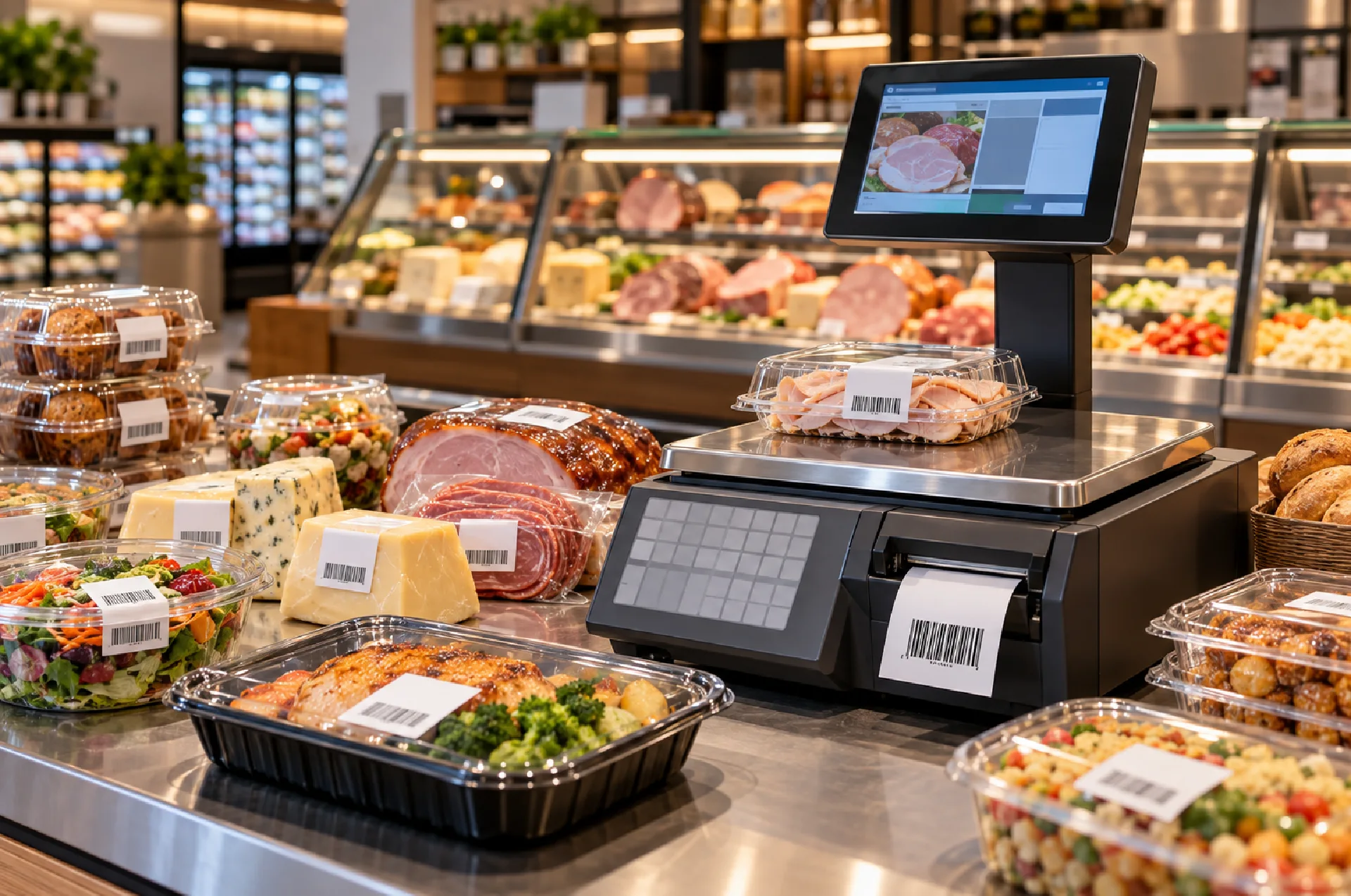
A supermarket employee weighs 750 grams of cheese, checks the unit price, calculates the total, writes down the amount, and sends the customer to checkout.
That process works, but it creates several chances for delay or error.
A barcode label scale brings weighing, pricing, product identification, and label printing into one workflow. The operator selects the product, places it on the scale, and prints a label containing information such as weight, unit price, total price, product name, and barcode.
The customer then takes the labeled product to checkout, where staff can scan the barcode instead of entering the weight and price again.
For supermarkets, grocery stores, meat counters, produce departments, bakeries, deli sections, and other retailers that sell goods by weight, this can make daily operations faster and more organized.
What Is a Barcode Label Scale?
A barcode label scale is a retail weighing scale with an integrated or connected label-printing system.
It performs three important jobs:
- Measures the product weight.
- Calculates the selling price based on the stored or entered unit price.
- Prints a barcode label containing the transaction details.
The exact features depend on the model.
Some systems allow businesses to store hundreds or thousands of products using PLU codes. Others may support custom label layouts, product names, dates, ingredient information, or different barcode formats.
The main idea remains the same: weigh the item once and turn that weighing result into a scannable retail label.
How Does a Barcode Label Scale Work?
The process usually starts with product selection.
Imagine a supermarket sells fresh cheese for AED 38 per kilogram.
The employee selects the cheese from the stored product list or enters its PLU code. The scale already knows the unit price.
The operator places 0.750 kg of cheese on the weighing platform.
The scale calculates:
0.750 kg × AED 38 = AED 28.50
It can then print a label showing information such as:
- Product name
- Net weight
- Price per kilogram
- Total selling price
- Barcode
- Packing date
- Other configured details
At checkout, the cashier scans the label.
This removes the need to weigh the product again or manually enter its price.
1. Barcode Label Scales Can Speed Up Checkout
Checkout speed has a direct effect on the customer experience.
When loose products reach the cashier without prepared pricing information, staff may need to enter codes manually, confirm prices, or send items back for weighing.
Barcode labels reduce those extra steps.
The weighing happens at the department where the product is prepared.
The cashier only needs to scan the label.
This approach works particularly well for:
- Deli counters
- Meat departments
- Seafood counters
- Cheese counters
- Fresh produce
- Bakery sections
- Nuts and dry foods
During busy shopping periods, removing even a few seconds from each transaction can help reduce queues.
2. They Reduce Duplicate Data Entry
Manual retail workflows often repeat the same information.
An employee weighs the item and calculates the price. Later, a cashier enters the same information into another system.
Every repeated entry creates another opportunity for mistakes.
A barcode label scale reduces this duplication.
Once the scale calculates the transaction, the printed barcode carries information that the checkout system can read.
Employees spend less time copying numbers from one place to another.
Retailers also gain a more consistent process because each department follows the same weighing and labeling workflow.
3. Better Pricing Accuracy
Products sold by weight rarely have identical final prices.
Two packs of the same cheese may weigh 650 g and 910 g. Their unit price stays the same, but the final selling price changes.
Barcode label scales handle this calculation automatically.
This works in a similar way to the retail weighing process explained in our guide to Price Computing Scales: Benefits for Retail Shops and Supermarkets.
The difference is that a barcode label scale takes the process one step further by turning the weight and price information into a printed label that can travel with the product.
This reduces the need for handwritten prices or manual calculator work.
4. PLU Codes Make Product Selection Faster
PLU stands for Price Look-Up.
Retailers can assign a PLU code to frequently sold products.
For example:
- 201 – Cheddar cheese
- 202 – Chicken breast
- 203 – Almonds
- 204 – Tomatoes
- 205 – Bakery cookies
The scale stores product information under each code.
Instead of entering the price manually for every transaction, the employee selects the correct PLU.
The system retrieves the stored details and performs the calculation.
For supermarkets that handle dozens or hundreds of weighed products, PLU memory can save significant time.
It also reduces the risk of employees remembering or entering the wrong price.
5. Printed Labels Improve Product Identification
A handwritten sticker may contain only a price.
A properly configured barcode label can carry much more useful information.
Depending on the equipment and business setup, labels may include:
- Product name
- Weight
- Unit price
- Total price
- Barcode
- Date
- Department information
- Batch information
- Product code
This makes individual packs easier to identify after they leave the weighing counter.
Customers can understand what they are buying, while employees have clearer product information during checkout or stock handling.
6. Better Workflow for Pre-Packed Products
Barcode label scales are not useful only when customers stand at the counter.
Retailers often prepare products before shoppers arrive.
A supermarket may pre-pack:
- Meat portions
- Cheese
- Seafood
- Nuts
- Bakery products
- Fruit
- Vegetables
Employees can weigh each pack during preparation and immediately print its price label.
Staff then place the labeled product into the refrigerated display or retail shelf.
Customers can pick up the product and take it directly to checkout.
This separates the weighing process from the checkout process and can improve customer flow in busy stores.
7. Barcode Labels Can Support Better Traceability
Retail traceability becomes more useful when businesses can connect physical products with organized data.
A label gives each package a visible identifier.
Depending on the system, the retailer may add product codes, dates, batch references, or other information.
This can help staff distinguish between similar products and maintain more organized shelf management.
Food businesses should choose labeling systems based on the information they genuinely need.
Adding more data does not automatically create a better label. Important details should remain easy for employees and customers to read.
8. Weight Accuracy Still Matters
Label printing does not make the scale accurate.
The weighing system still needs to measure the product correctly.
Consider a supermarket that sells hundreds of kilograms of meat every day.
If the scale consistently underreads, the store may give away product without charging for the full quantity.
If it overreads, customers may pay for more weight than they actually receive.
Both outcomes create problems.
Our guide on Why Accurate Weighing Is Important in Industrial Operations explains how small repeated weighing errors can affect costs and records.
Retailers should include regular checking and calibration in their weighing-equipment routine.
9. Tare Is Essential for Packaged Products
A customer should pay for the food inside the container, not the tray or packaging.
That makes the tare function especially important for barcode label scales.
Imagine a plastic tray weighs 40 g.
The employee places the empty tray on the scale and uses the tare function to return the display to zero.
The product goes into the tray.
The scale now measures only the net product weight.
The printed label can then reflect the correct selling weight.
Without proper tare procedures, packaging weight can accidentally become part of the amount charged to the customer.
10. Label Quality Matters Too
A technically correct barcode is not useful if a scanner cannot read it.
Retailers should consider print quality, label material, adhesive performance, and the environment where the product will sit.
Cold displays can create different conditions from dry grocery shelves.
Moisture may also affect labels used around meat or seafood counters.
The printed barcode needs enough contrast and clarity for reliable scanning.
Labels should also stay attached throughout normal handling until the customer reaches checkout.
11. Think About Connectivity
Barcode label scales often become more valuable when they fit into the store’s wider retail system.
Depending on the equipment, businesses may want product information, pricing, or transaction data to connect with other retail software.
Before purchasing, ask how product prices will be updated.
If a supermarket changes the price of dozens of items, staff should not have to update every scale manually if a more efficient system is available.
The right connectivity depends on the retailer’s existing POS and store-management setup.
Discuss compatibility before purchasing instead of assuming that every barcode scale connects with every POS system.
12. Choose a Scale That Fits the Department
Not every supermarket department has the same requirements.
A dry-food counter may need simple cleaning and a standard retail platform.
A seafood department may deal with water and regular washdowns.
A bakery may prioritize fast PLU access.
A high-volume meat counter may care more about printing speed and label durability.
For wet food environments, read our guide on Waterproof Weighing Scales: Benefits for Food and Industrial Businesses.
The scale should match both the retail function and the working environment.
13. Consider Capacity and Readability
Do not choose a barcode scale only for its printer.
The weighing specifications still matter.
Capacity should comfortably cover the heaviest quantity employees normally place on the scale.
Readability determines the smallest weight increment shown.
A supermarket produce department may need different specifications from a counter that handles small portions of expensive products.
Choose enough capacity without unnecessarily oversizing the scale.
14. Calibration Protects the Complete Retail Process
A barcode label may look professional, but its printed information depends on the underlying measurement.
If the weighing result is wrong, the total price printed on the label can also be wrong.
Regular verification and calibration help retailers maintain confidence in the process.
Businesses can review Al Falah Scales weighing services when planning inspection or calibration of commercial weighing equipment.
Calibration should form part of routine scale management rather than something stores consider only after a problem appears.
Frequently Asked Questions
What is a barcode label scale?
A barcode label scale weighs a product, calculates its price, and prints a label containing a barcode and other transaction information.
Where are barcode label scales commonly used?
Supermarkets, delis, butcher shops, seafood counters, bakeries, produce sections, and stores selling loose goods by weight commonly use them.
What information can a barcode scale print?
Depending on the model, labels may include product name, weight, unit price, total price, barcode, dates, and product codes.
What is a PLU code?
A PLU or Price Look-Up code allows the scale to retrieve stored product information quickly.
How do barcode label scales speed up checkout?
The product arrives at checkout already weighed and priced. The cashier can scan the barcode instead of manually entering the weight and price.
Can barcode scales connect to POS systems?
Some systems offer connectivity, but compatibility depends on the scale and POS software. Retailers should confirm integration before purchasing.
What is tare on a barcode scale?
Tare removes the packaging or container weight so the customer pays only for the product’s net weight.
Are barcode label scales suitable for meat and seafood counters?
Yes, but businesses should choose equipment and labels that suit moisture, cleaning, and hygiene requirements.
Do barcode scales require calibration?
Yes. Regular verification and appropriate calibration help maintain reliable weight and price calculations.
Where can UAE retailers find weighing solutions?
Retailers can contact Al Falah Scales to discuss weighing equipment for supermarkets, food counters, grocery stores, and other commercial applications.
Final Thoughts
Barcode label scales improve retail operations because they connect several tasks that stores would otherwise handle separately.
They weigh the product, calculate its price, identify it, and create a scannable label in one workflow.
That can mean faster service at fresh-food counters, fewer manual calculations, smoother checkout, and clearer product identification.
The printer alone should not drive the buying decision.
Retailers should also consider capacity, readability, PLU storage, POS compatibility, tare functions, label quality, working environment, cleaning requirements, and calibration.
A supermarket produce section, meat counter, bakery, and seafood department may all need slightly different configurations.
For retailers in the UAE looking to improve their weighing and labeling workflow, Al Falah Scales provides commercial and industrial weighing solutions along with technical weighing support for a range of applications.